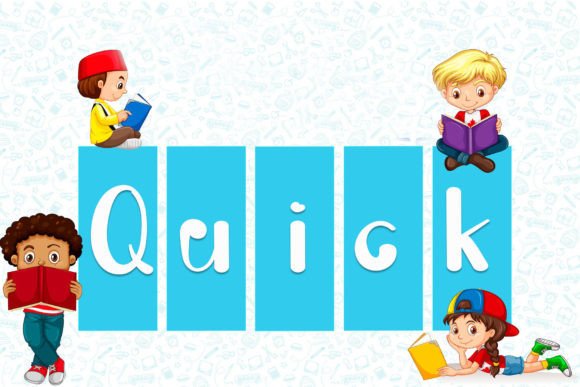
Quick: A Playful Display Font for Handwritten Design Touches
In the crowded landscape of digital and print design, standing out often comes down to personality. While clean sans-serifs and structured serifs dominate corporate communications, there is a specific niche where warmth, approachability, and human connection are paramount. This is where Quick shines. It is not merely a typeface; it is a tool for injecting life into static layouts. Designed as a playful and cute display font, Quick offers designers, entrepreneurs, and creators an immediate way to convey friendliness without sacrificing legibility.
For professionals ranging from freelance graphic designers to small business owners launching their first brand, the choice of typography can make or break the initial impression. Quick addresses the common challenge of wanting a "handwritten" aesthetic that remains professional and readable at various sizes. Whether you are crafting a wedding invitation suite, designing a logo for a boutique bakery, or creating social media graphics for a lifestyle blog, this typeface provides a distinct visual voice that feels personal yet polished.
Understanding the Visual Identity of Quick
At its core, Quick is engineered to mimic the fluidity and charm of hand-lettering while maintaining the consistency required for commercial use. The term "playful" in typography does not mean chaotic; rather, it suggests a lightness of spirit and an inviting structure. The characters feature soft curves and slight irregularities that hint at human creation, which helps build an emotional bridge between the viewer and the content.
This aesthetic is particularly valuable in industries where trust and personal touch are key. For educators creating classroom materials, Quick can make learning resources feel less rigid. For marketers targeting younger demographics or family-oriented products, the font signals approachability. Unlike overly ornate script fonts that can become difficult to read at smaller sizes, Quick strikes a balance. It retains enough structure to be deciphered quickly, ensuring that your message is received with clarity rather than confusion.
When you select Quick for a project, you are choosing a typeface that communicates joy and creativity. It works exceptionally well for branding elements that need to evoke nostalgia or comfort. Think of a greeting card company looking for a font that feels like a hug, or a local cafe wanting a menu board that feels cozy and welcoming. In these scenarios, the visual weight and character of Quick align perfectly with the desired emotional response.
Practical Applications Across Industries
The versatility of Quick allows it to be deployed across a wide spectrum of design projects. Its strength lies in its ability to serve as a display font, meaning it is best used for headlines, titles, and short phrases rather than long-form body text. Here is how different professionals might leverage this asset in their daily workflows.
- Wedding and Event Planners: One of the most common and effective uses for Quick is in wedding invitations and save-the-date cards. The playful nature of the font adds a touch of whimsy to formal documents. When paired with elegant serif fonts for the body text, Quick can highlight names, dates, or key phrases, creating a beautiful contrast that guides the eye.
- Small Business Owners: For entrepreneurs in the craft, food, or wellness sectors, Quick is ideal for business cards and logos. A logo featuring Quick can instantly communicate that a brand is friendly and accessible. On business cards, using Quick for the name or tagline can make the card more memorable, encouraging recipients to keep it rather than discard it.
- Content Creators and Bloggers: In the digital space, attention spans are short. Using Quick for featured post titles or pull quotes can break up dense text and add visual interest. It helps create a unique brand identity for bloggers who want their site to feel curated and personal, distinguishing their work from generic templates.
- Marketing and Advertising: Billboards and large-format prints benefit from bold, distinctive typography. Quick’s playful curves can capture attention from a distance. When used for promotional posters or social media ads, the font’s cute aesthetic can stop the scroll, drawing users into the advertisement before they even read the copy.
Technical Advantages: The Power of PUA Encoding
Beyond aesthetics, the technical specifications of Quick offer significant practical benefits for designers. The font is PUA (Private Use Area) encoded. To understand why this matters, it is helpful to look at the workflow challenges many designers face when working with decorative fonts.
Standard font files often limit the number of special characters, swashes, and alternate glyphs available through standard keyboard inputs. This can force designers to manually search through character maps or use complex workarounds to access the full range of a font’s features. PUA encoding solves this by mapping all glyphs, including swashes and alternates, to accessible codes within the Private Use Area of the Unicode standard.
What does this mean for you? It means you can access every single glyph and swash variation with ease. If you are designing a logo and need a specific flourish on the letter 'Q' or a decorative end-cap for a headline, you do not have to hunt for it. The entire library of variations is readily available. This streamlines the creative process, allowing you to experiment with different looks quickly without technical friction. It ensures that the final design is consistent and that no potential stylistic option is left unused due to accessibility issues.
Enhancing Creativity Through Accessibility
This ease of access directly supports creativity. When technical barriers are removed, designers can focus more on composition and messaging. You can test multiple variations of a headline in minutes, seeing how different swashes change the tone of the message. This iterative process leads to more refined and thoughtful designs. For freelancers managing tight deadlines, the efficiency gained from PUA encoding is invaluable. It reduces the time spent on file management and character selection, freeing up more time for strategic thinking and client communication.
Strategic Considerations and Best Practices
While Quick is a powerful tool, like any typeface, it requires thoughtful application to achieve the best results. Understanding its limitations and proper usage context will help you maximize its impact.
Pairing Strategy: Because Quick is a display font with strong personality, it works best when paired with simpler, neutral typefaces. A clean sans-serif or a classic serif can provide a stable foundation for body text, allowing Quick to stand out as the accent. Avoid pairing Quick with other highly decorative or busy fonts, as this can create visual clutter and reduce readability.
Scale and Hierarchy: As mentioned, Quick is designed for display purposes. Using it for paragraphs of text can lead to eye strain and poor comprehension. Reserve Quick for headlines, subheads, button labels, and short captions. This hierarchy ensures that your audience can scan your content easily while still appreciating the artistic flair of the font.
Contextual Fit: Not every brand voice aligns with a playful aesthetic. If you are designing for a law firm, a financial institution, or a medical provider, Quick may undermine the authority and seriousness required for those fields. Always consider the expectations of your target audience. Quick is perfect for brands that want to appear modern, youthful, creative, or warm. It is less suitable for contexts demanding strict formality or minimalism.
Conclusion
Choosing the right typography is a critical step in effective communication. Quick offers a compelling solution for those seeking to add a handwritten, playful touch to their designs. Its combination of charming aesthetics and robust technical features, such as PUA encoding, makes it a valuable asset for a wide range of professionals.
Whether you are enhancing a wedding invitation, refining a brand logo, or creating engaging social media content, Quick provides the flexibility and character needed to make your work stand out. By understanding its strengths and applying it strategically, you can improve the presentation of your projects, strengthen your brand’s personality, and connect more effectively with your audience. In a world of digital noise, a touch of playful humanity can make all the difference.